
Technical Overview
AI agents and workflows that reason across your documents
Single-tenant in your cloud. Any frontier model you choose. LLM usage billed at cost. Deterministic workflows where consistency matters, full audit trails throughout.
Three structural differences
CompleteFlow inverts the SaaS legal AI model.
Harvey, Legora, and CoCounsel are multi-tenant SaaS, locked to a vendor-chosen model, with token costs bundled into per-seat pricing. CompleteFlow is built the other way around, on every axis.
01 / TENANCY
Single tenant by architecture
A dedicated CompleteFlow instance in your Azure, AWS, or GCP tenancy. Your own database, your own vector store, your own object storage. No other firm shares any layer of your stack.
Privacy isn't a policy. It's architecturally impossible for your data to mix with another customer's, because there's no shared layer to mix it in.
02 / MODEL
Model-agnostic by design
Claude, GPT, Gemini, Azure OpenAI, or open-weight models (Llama, Mistral) hosted in your own tenancy. A model registry maps tiers (budget, standard, premium) to providers, so you swap models without touching agent code.
Route sensitive matters to a sovereign model, run research on the frontier, and switch when something better ships. You don't inherit your vendor's bet on which lab wins.
03 / PRICING
LLM usage at cost
Bring your own Anthropic, OpenAI, Azure, or Google Cloud account. Tokens are billed directly by the model provider at their published rates. The CompleteFlow platform fee is separate and predictable.
Per-seat AI SaaS makes margin on every prompt your team runs, then throttles usage to protect it. Our incentive is the opposite: the more your team uses the platform, the more it's worth.
Side by side
How CompleteFlow compares to the leading SaaS legal AI platforms. For a deeper teardown by competitor, see the compare page.
| Harvey / Legora / CoCounsel | CompleteFlow | |
|---|---|---|
| Tenancy | Multi-tenant SaaS | Single-tenant in your cloud or on-premises |
| Where data lives | Vendor infrastructure | Your Azure, AWS, GCP, or on-premises environment |
| Encryption keys | Vendor-managed | Customer-managed (CMK / HSM-backed) |
| Model choice | Vendor-selected, opaque | Any frontier or open-weight model, swappable per workflow |
| Token pricing | Marked up, bundled into seat fees | Pass-through: you pay the model provider directly |
| Usage caps | Per-seat usage limits, overages | No platform-side caps. Spend what your providers allow. |
| Customisation | Vendor roadmap, vendor pace | Open agent framework, your team or ours can extend it |
| Exit | Their data export, their format | You already own the deployment. Take the agents with you. |
How It Works
Two modes of operation. One platform.
A conversational AI agent handles the unpredictable work: interpreting documents, answering questions, reasoning across sources. When precision matters, the agent invokes a deterministic workflow that executes identically every time. The user sees one interaction. The platform chooses the right tool for each part of the job.
Deterministic Workflows
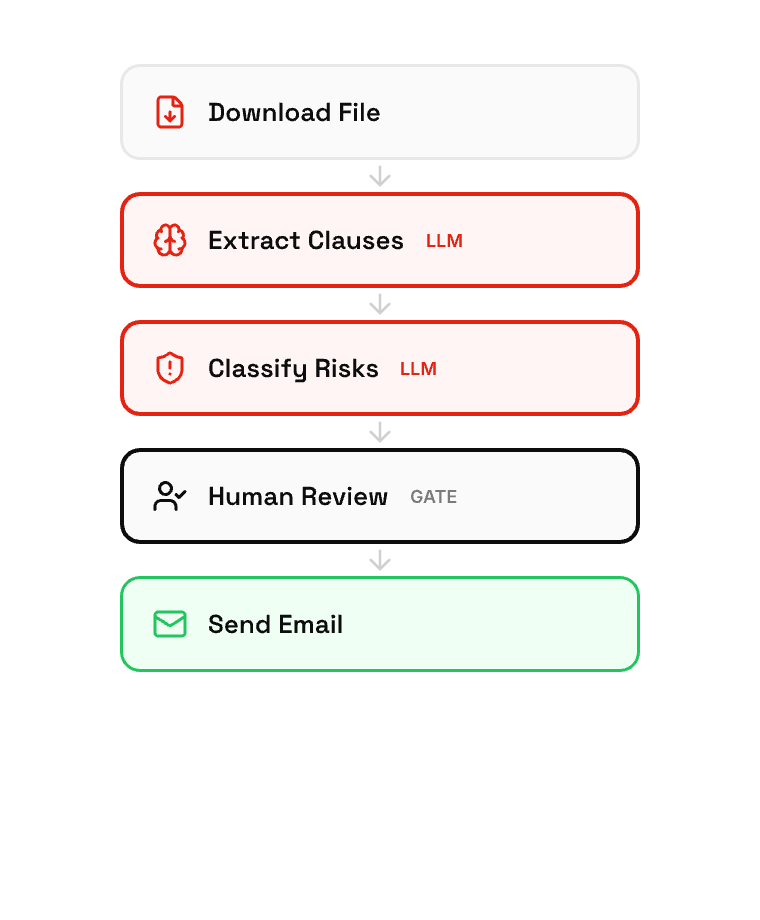
Every step defined. Every outcome predictable. Auditable end to end.
Agentic AI with Tools
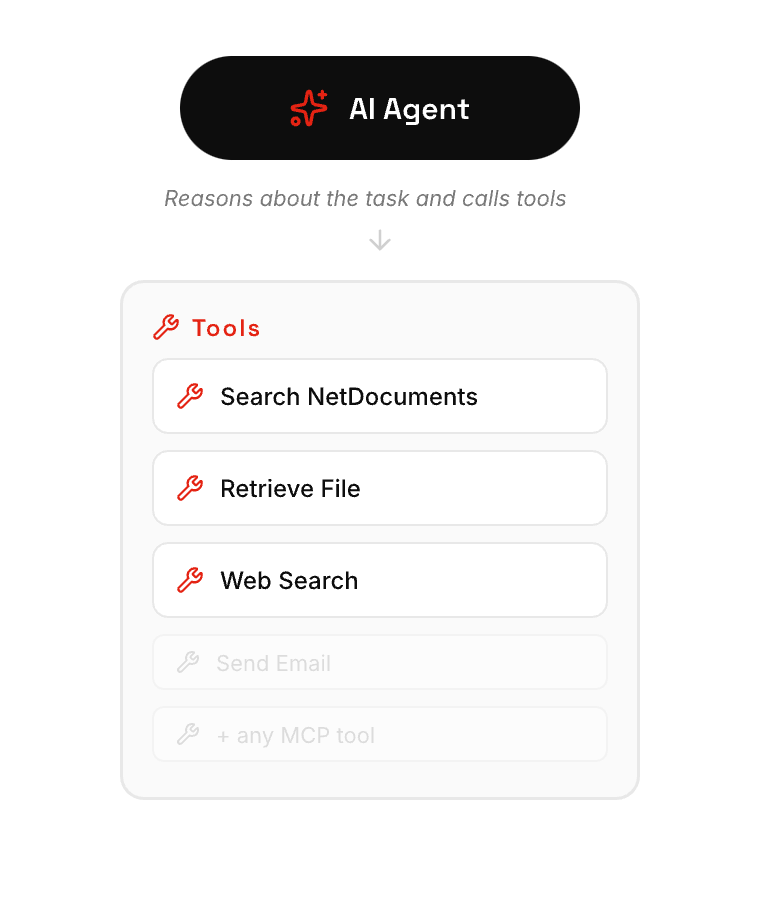
AI reasons about the task and picks the right tools. Adapts to novel requests.
Why not both
An agent can call a workflow as a tool. The workflow runs deterministically and returns the result to the agent. Reliability where you need it, intelligence where it counts.
Example
"When was Helen Lane appointed director of Morrison Holdings, and did that happen before or after the share transfer?"
Agent calls the chronology workflow on the disclosure bundle, reads the output, answers with source references.
Workflow Engine
Built for reliability, not just vibes
Workflows are idempotent: rerunnable without duplication or inconsistency. The engine handles scheduling, retries, parallel execution, and state recovery automatically. When a workflow hits a human review gate, it suspends and resumes after approval.
Expressive, readable logic
Business rules expressed as readable code, not sprawling node graphs. A legal professional can read it and verify it's correct.
score = 0
score = score + 3 if contract_value > 500000
score = score + 2 if days_until(renewal) < 90
score = score + 2 if governing_law != "England and Wales"
score = score + 3 if liability_cap = "uncapped"
Auditable, version-controlled, diffable. We also provide a no-code visual builder to generate these expressions.
Production-grade orchestration
- ✓ Idempotent execution: rerun any workflow without duplication
- ✓ Automatic retries with exponential backoff on failures
- ✓ Parallel fan-out across branches with result aggregation
- ✓ Human-in-the-loop gates: suspend, wait for approval, resume
- ✓ Scheduled and event-driven triggers (email, calendar, file changes)
- ✓ Full observability: run status, duration, cost, and reasoning traces
Workflow Builder
Visual or code. Your choice.
Build workflows visually with drag-and-drop, or write expressions for complex logic. Configure extraction schemas, approval gates, and output formats. Connect workflows to agents as tools so the AI can invoke them when the task demands precision.
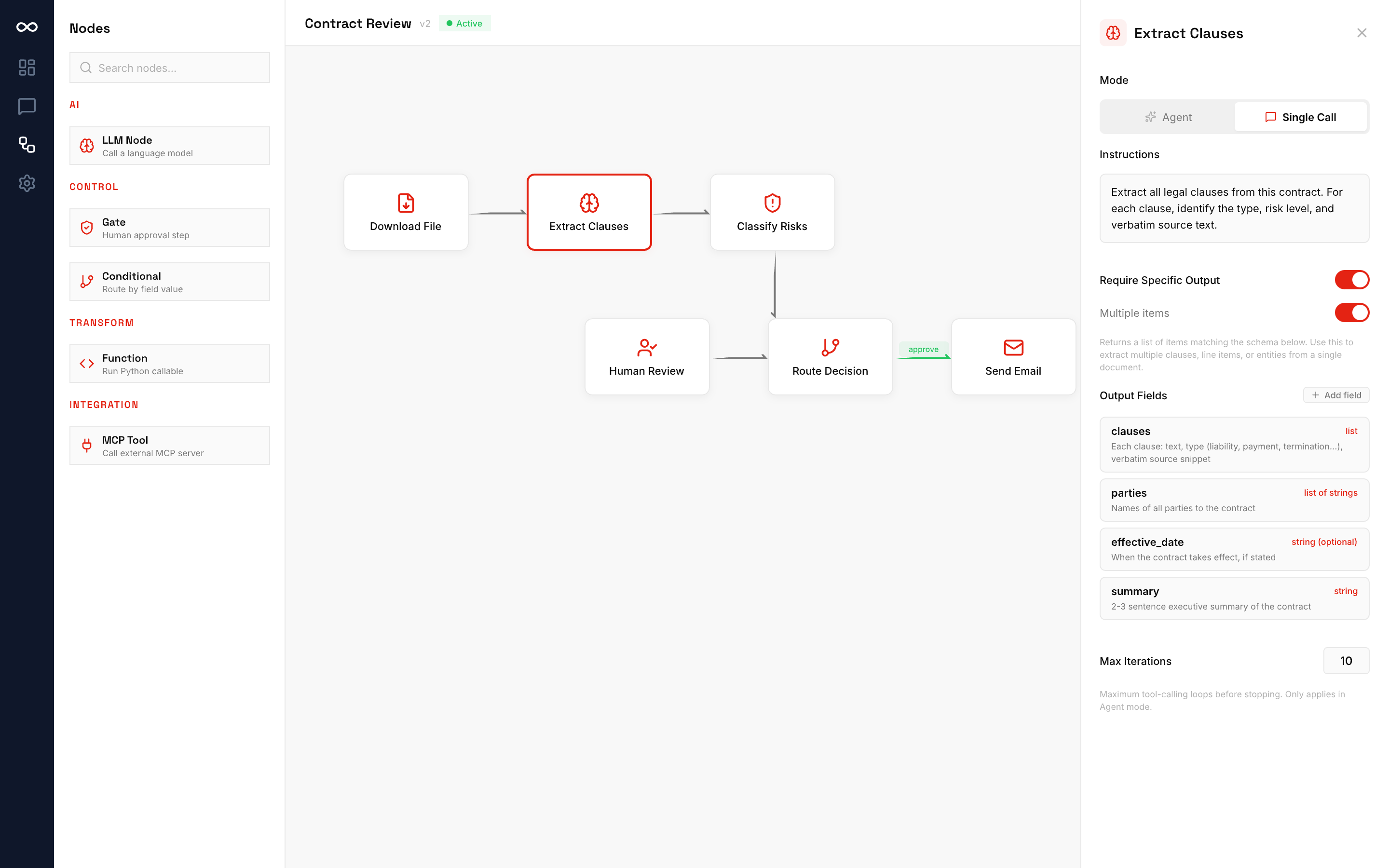
State machine execution
Workflows modelled as state machines with validated transitions. Every state change logged. Version-controlled definitions with rollback.
Agents invoke workflows
An agent can call any workflow as a tool. The workflow runs deterministically and returns the result. AI flexibility with guaranteed consistency.
Triggered or scheduled
Run workflows manually, on a schedule, or in response to events: new emails, calendar invites, file uploads, or API calls.
Agent Builder
From idea to production agent in minutes
Define agents with code or the guided builder UI. Connect data sources, set governance rules, test against real data in a sandbox, and deploy to production with full audit logging from the start.
Define the task
Describe what your agent should do. Connect data sources (SharePoint, email, APIs) and set guardrails. Choose your model tier and provider.
Test and refine
Run your agent against real data in a sandboxed environment. Review outputs, check reasoning traces, and tune behavior before going live.
Deploy with governance
Push to production with full audit logging, access control policies, human-in-the-loop controls, and cost monitoring.
Governance
Every AI decision. Logged. Explainable. Reviewable.
Built to meet the governance requirements of regulated industries, from financial services to legal to government. Not bolt-on compliance. Governance is built into the agent execution pipeline.
Immutable audit trail
Two configurable levels: minimal (summary, model, tokens, cost, policy decisions) and maximal (full prompt and response). Every record timestamped with user attribution and agent version. Default 7-year retention.
Access control
Workgroup-based role system with default-deny policies. Users access only the documents, workflows, and tools their role permits. Every access decision is logged.
Human-in-the-loop
Agents escalate to humans when confidence drops below configurable thresholds. Review queues surface low-confidence outputs for approval, rejection, or correction, and corrections feed back into agent improvement.
Workgroup permissions
Organize users into workgroups (matters, teams, projects) with granular roles: owner, contributor, reviewer, viewer. AI agents can only access resources the user is authorized to see.
Cost tracking & attribution
Per-agent, per-user LLM cost attribution with token-level granularity. Track spend by model tier, provider, and department. Set usage quotas and budget alerts per team.
Reasoning traces
Every agent output includes the chain of tool calls, data sources consulted, confidence scores, and the decision path that led to the result. Exportable for regulatory review.
Enterprise Features
Built for production
Multi-provider LLM
Swap between Anthropic, OpenAI, Azure OpenAI, and open-weight models without changing agent code. All commercial API tiers. Your data is never used for model training. Model registry maps tiers to providers.
Channel abstraction
Agents are channel-neutral. Deploy the same agent to Teams, Copilot Chat, web UI, or API. The channel adapter handles formatting and auth.
Delegated OAuth
Agents inherit the requesting user's Microsoft 365 permissions via delegated tokens. No separate credential store. No over-provisioned service accounts.
Workflow orchestration
Multi-step workflows with parallel fan-out, conditional routing, human gates, and automatic retry. Idempotent execution means workflows are rerunnable without duplication or inconsistency across any environment.
Workgroup-based access control
Organise resources into workgroups with granular roles. Control exactly what each user can access per workgroup. Single-tenant deployment with database-level isolation.
Natural language interface
Users invoke workflows through conversation in Teams, Copilot, or the web UI. Agents auto-discover registered workflows and expose them as conversational tools.
Review queue
Batch approval dashboard for human oversight. Review low-confidence outputs, approve or reject with notes, make field-level corrections. Workflows suspend and resume automatically around human decisions.
Vector search
Built-in similarity search for retrieval-augmented generation across your internal document corpus.
Container-native deployment
Docker Compose for development, Azure Container Apps for production. Hub-spoke VNet with private endpoints. IaC with Bicep.
Agent versioning
Version-controlled agent configurations with rollback capability. Promote agents through dev, staging, and production environments with full traceability.
Webhook notifications
Notify external systems (Slack, email, SIEM) when agents complete tasks, escalate to humans, or trigger policy violations.
SSO & identity
Native Microsoft Entra ID integration. Extensible to Okta, Google Workspace, and SAML 2.0 identity providers for broader enterprise deployment.
Deployment
Your deployment. Your rules.
Private Cloud
Deploy on your own Azure, AWS, or GCP tenancy. Container-native with Azure Container Apps or ECS. Hub-spoke VNet with private endpoints. Data never leaves your environment.
CompleteFlow Cloud
Hosted and managed by us on private cloud infrastructure. We handle ops, updates, and monitoring. You get the fastest path to production with data residency in your chosen region.
On-Premises
Full air-gapped deployment on your own hardware. Docker Compose or Kubernetes. Open-weight models only. Maximum isolation for the most sensitive workloads.
Integrations
Connects to your existing systems via MCP
CompleteFlow agents connect to external systems through the Model Context Protocol (MCP), the open standard for tool integrations. Native Microsoft 365 support via Graph API with delegated user permissions, plus any system with an MCP server.
Plus anything with an MCP server. The list grows every week. Custom integrations scoped during pilot.
FAQ
Technical questions
What models does CompleteFlow support? +
How does access control work? +
How does the audit trail work? +
Where does my data go? +
How do agents access our documents? +
What happens when an agent isn't confident? +
How does the workflow engine work? +
Can we run this without Microsoft 365? +
Can your team build custom solutions and features? +
See the platform in action
Book a 30-minute technical walkthrough tailored to your industry and infrastructure requirements.
Book a Technical Demo