
Compare
CompleteFlow vs Bryter BEAMON
Two approaches to legal automation. A no-code rules engine with bolt-on AI (Bryter BEAMON), or an AI agent platform with built-in workflow orchestration.
The difference in one example
Example
Proactive meeting preparation
CompleteFlow
A calendar invite arrives for a client meeting. A workflow configured to trigger on calendar events automatically retrieves the matter history from your DMS, summarises recent interactions from email and Teams, pulls the attendee's recent LinkedIn posts and relevant news, and delivers a briefing note to the lawyer before the meeting starts.
Bryter BEAMON
Bryter cannot do this. All Bryter workflows must be manually triggered by a user opening an application and walking through it. There are no event-driven triggers, no scheduled runs, and no background monitoring. BEAMON Assist can answer questions when asked, but workflows cannot run automatically in response to external events.
Architecture: rules engine vs agent platform
Bryter started as a rules engine. Its core product is a visual editor where legal engineers build decision trees: nodes for questions, conditions on transitions, action nodes for calculations and document generation. AI capabilities were added later as BEAMON, a separate product suite with chat, drafting, and extraction tools.
CompleteFlow was built as an AI agent platform from day one. Agents handle the work that requires judgement: interpreting documents, reasoning across sources, responding to natural language. When a task demands precision, the agent invokes a deterministic workflow that executes identically every time. The user sees one interaction. The platform chooses the right approach for each part of the task.
This is not a cosmetic difference. It determines what kinds of problems each platform can solve.
Expressions vs node sprawl
Bryter has no expression language. Every condition, calculation, and filter is a separate node in a visual graph. As complexity grows, workflows sprawl. A compliance assessment with conditional weighting can easily reach 80-100 nodes. Changing one business rule means tracing paths through the graph and testing every affected branch.
Here is the same task expressed both ways: "Score a contract's risk: add points for high value, upcoming renewal, foreign governing law, and uncapped liability."
CompleteFlow: 5 lines
score = 0
score = score + 3 if contract_value > 500000
score = score + 2 if days_until(renewal) < 90
score = score + 2 if governing_law != "England and Wales"
score = score + 3 if liability_cap = "uncapped"
Readable, auditable, version-controlled.
We also provide a no-code visual builder to generate these expressions.
Bryter
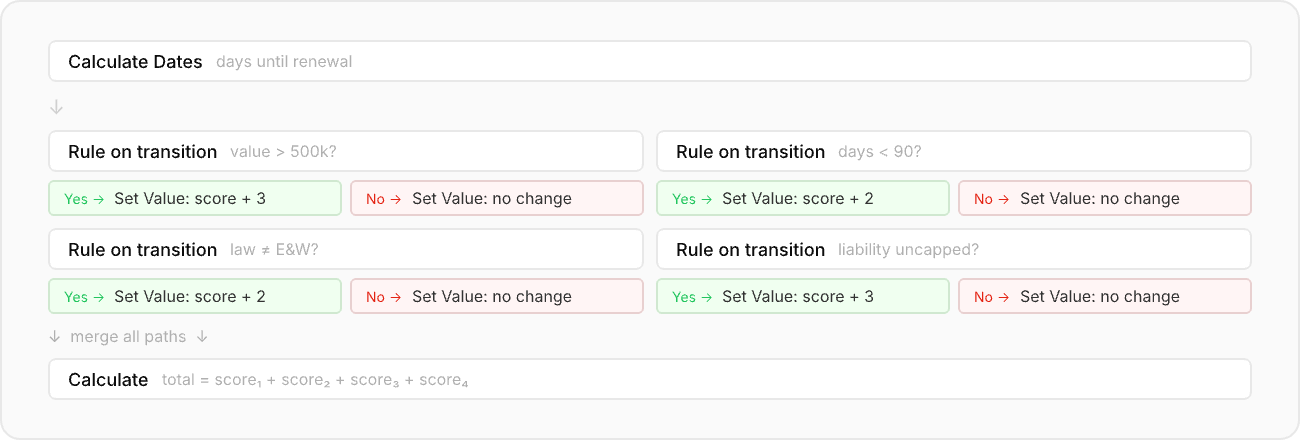
Multiple Set Value nodes and Calculate nodes, with branching logic embedded in the transitions between them. The date comparison alone needs a separate Calculate Dates node. Each scoring factor adds another fork in the graph.
Cross-document analysis
Bryter's BEAMON product includes a "file-to-timeline converter" that uses AI to extract dates and events from uploaded documents into a chronology. This works for straightforward extraction from individual documents.
CompleteFlow handles the harder problem: cross-document analysis where you need to compare statements, values, or dates across multiple documents and flag contradictions.
Example
M&A due diligence across 200 data room documents
CompleteFlow
CompleteFlow extracts key figures from each document, then runs deterministic validation: does the revenue in the management accounts match the vendor DD report? Do the property addresses in the lease schedule match the title register? Where values conflict, the agent examines both source passages and explains the discrepancy. The output is a structured exception report with source references, routed to a partner for review if items exceed a risk threshold. One pipeline, one audit trail.
Bryter
Bryter's BEAMON Extract can populate the extraction table. But the cross-validation, the AI-driven explanation of why two figures differ, and the conditional routing happen either manually or in a separate workflow product that cannot call back to the AI mid-execution.
AI integration model
Bryter separates AI and workflows into distinct products. BEAMON AI (Assist, Draft, Extract) handles AI tasks. Bryter Workflows handles rule-based automation. The two connect, but they are architecturally and commercially separate.
CompleteFlow integrates AI and workflows in a single execution pipeline. An agent can invoke a workflow as a tool. A workflow can call an agent for a step that requires judgement. Governance (audit trail, access control, human-in-the-loop) applies uniformly across both. There is one platform, one audit trail, one deployment.
Comparison summary
| Capability | CompleteFlow | Bryter BEAMON |
|---|---|---|
| Architecture | AI agents + workflow engine, unified | Rules engine + bolt-on AI (BEAMON), separate products |
| Expression language | JSONata (code + visual builder) | None (individual node types per operation) |
| Cross-document analysis | Agent extraction + deterministic validation | AI extraction only (BEAMON) |
| Data processor | You (or your cloud provider) | Bryter GmbH |
| Audit trail | Full provenance, 7-year default, reasoning traces | Activity logging within platform |
| LLM choice | Any provider (Anthropic, OpenAI, open-weight) | Bryter-managed (OpenAI on their Azure) |
| Workflow triggers | Manual form, schedule, file changes, email, calendar events | Manual form only |
| Workflow builder | Visual + expression-based, configurable per client | Visual node graph, fixed node types |
| Microsoft 365 | Native (SharePoint, Teams, Entra ID SSO) | Native (SharePoint, Teams) |
Where Bryter is stronger
Bryter has been in market since 2018 and holds ISO 27001:2022 and SOC 2 Type II certifications. BEAMON, their AI product suite, launched in 2025. They have an established customer base including global law firms (Ashurst, Linklaters, Hausfeld, Luther) and corporates (McDonald's, ING Bank, Rakuten, Telefonica).
Its no-code editor is mature and well-documented, with a large library of help centre articles and a training programme. For straightforward decision tree automation and document generation from questionnaire inputs, Bryter is a proven solution with a track record.
Where CompleteFlow is stronger
CompleteFlow is built for the problems that rules engines cannot solve: tasks that require AI judgement combined with deterministic precision, cross-document reasoning, and complex data transforms.
If your workflows involve ingesting unstructured documents, reasoning across multiple sources, transforming data between systems, CompleteFlow provides capabilities that Bryter's architecture does not support.
The fundamental question is whether your automation needs are best served by a visual decision tree with AI bolted on, or by an AI agent platform with workflows built in.
Ready to see the difference?
Book a 30-minute session and we will walk through your specific use cases, showing exactly how CompleteFlow handles them compared to a rules-engine approach.
Book a Strategy Session